

Pricing policy: channels, models and price limits
Give your platform key eligible routes and understand defaults and overrides.
What this page controls
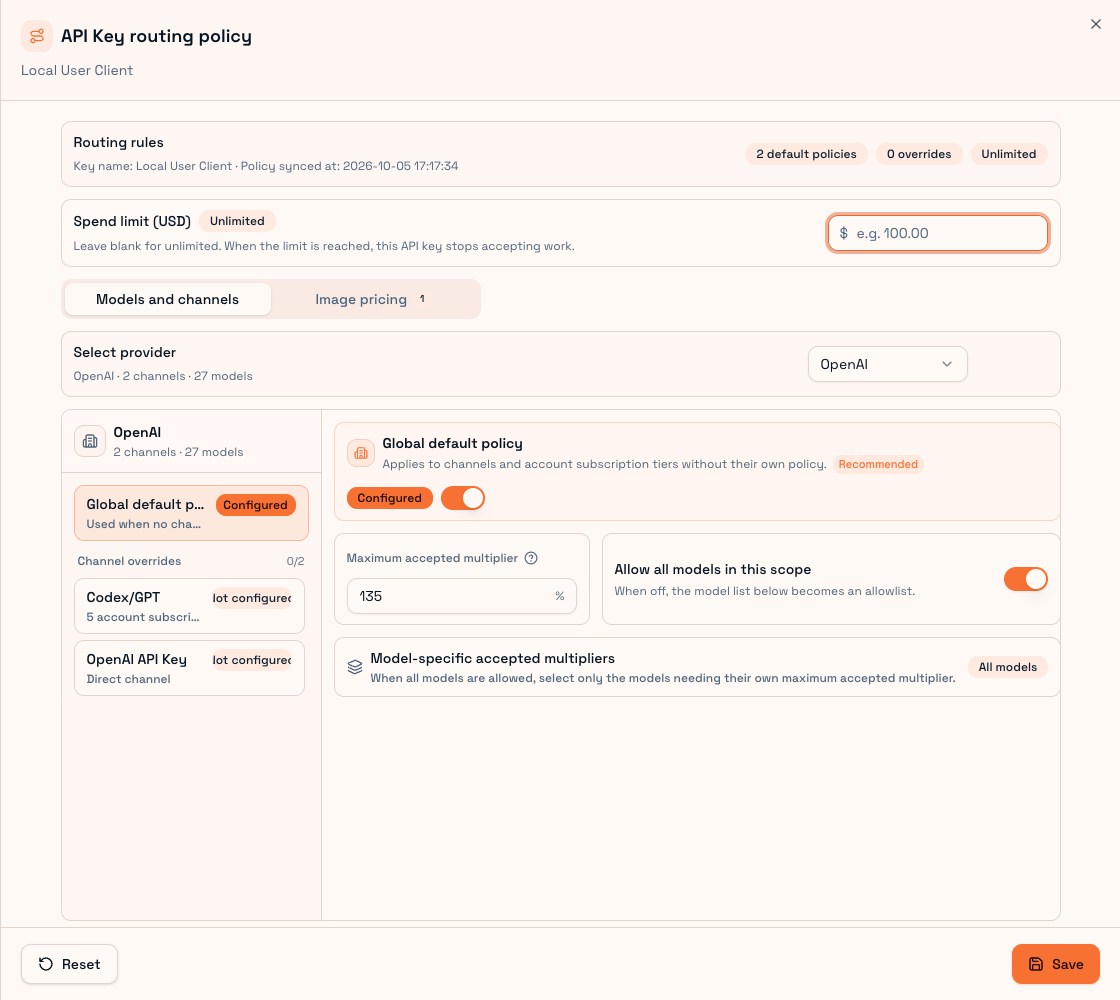
Pricing policy gives one website User API Key eligible providers, channels, subscription tiers, models and maximum acceptable prices. Creating a key without routing can produce a 409 configuration error.
First configuration
- Open API keys on the website and locate the key used by your Client.
- Open Pricing policy and select OpenAI, Claude or another available provider.
- Enable its global default and enter a maximum multiplier.
- Choose all supported models or a whitelist.
- Leave channel/tier overrides off unless you need them.
- Save at the bottom of the whole sheet. Done inside a model dialog only finishes that editor.
Override order
Provider defaults apply where no channel policy exists. Channel overrides specialize a channel; plan overrides specialize a subscription tier; model-specific prices specialize individual models.
These settings cannot grant upstream plan capabilities. Final account plan, quota and platform capacity still matter.
All models versus whitelist
With All models enabled, supported models in that scope are allowed. Add a model only when it needs a dedicated multiplier. An empty or invalid override disables Done; remove the model if it needs no override.
With All models disabled, the selected list is a whitelist and needs at least one model. A blank model multiplier can inherit the scope price.
Price ceiling and spending limit
The ceiling limits eligible supplier quotes. The spending limit caps cumulative key expenditure. Neither replaces wallet balance or guarantees supply. Market reference values are current observations, not a promise about future charges.
Images use the Image prices tab and maximum unit prices for specific model/size/quality specifications. A text percentage does not substitute for an image unit-price ceiling.
After saving, synchronize Client policy and confirm that the local key is usable. Inspect Usage records for the selected quote and Troubleshooting for permission or capacity failures.