

TEE trust and encryption: verify the processor
Understand attestation, registry, allowlists and encrypted sessions with their limits.
Open source and attestation solve different problems
Source code can be reviewed. Remote attestation helps the Client check the running remote identity against accepted releases. A familiar website address alone does not prove the program running there.
The Client verifies evidence, identity and the bound communication key before creating an encrypted session. A verified Worker processes content and sends the required input to the selected upstream provider.
TEE trust page
The page shows the verified registry and configurations, allow/block state and Claims. Trust-all or manual allowlisting chooses which verified configurations you accept; it is not a signature/attestation bypass.
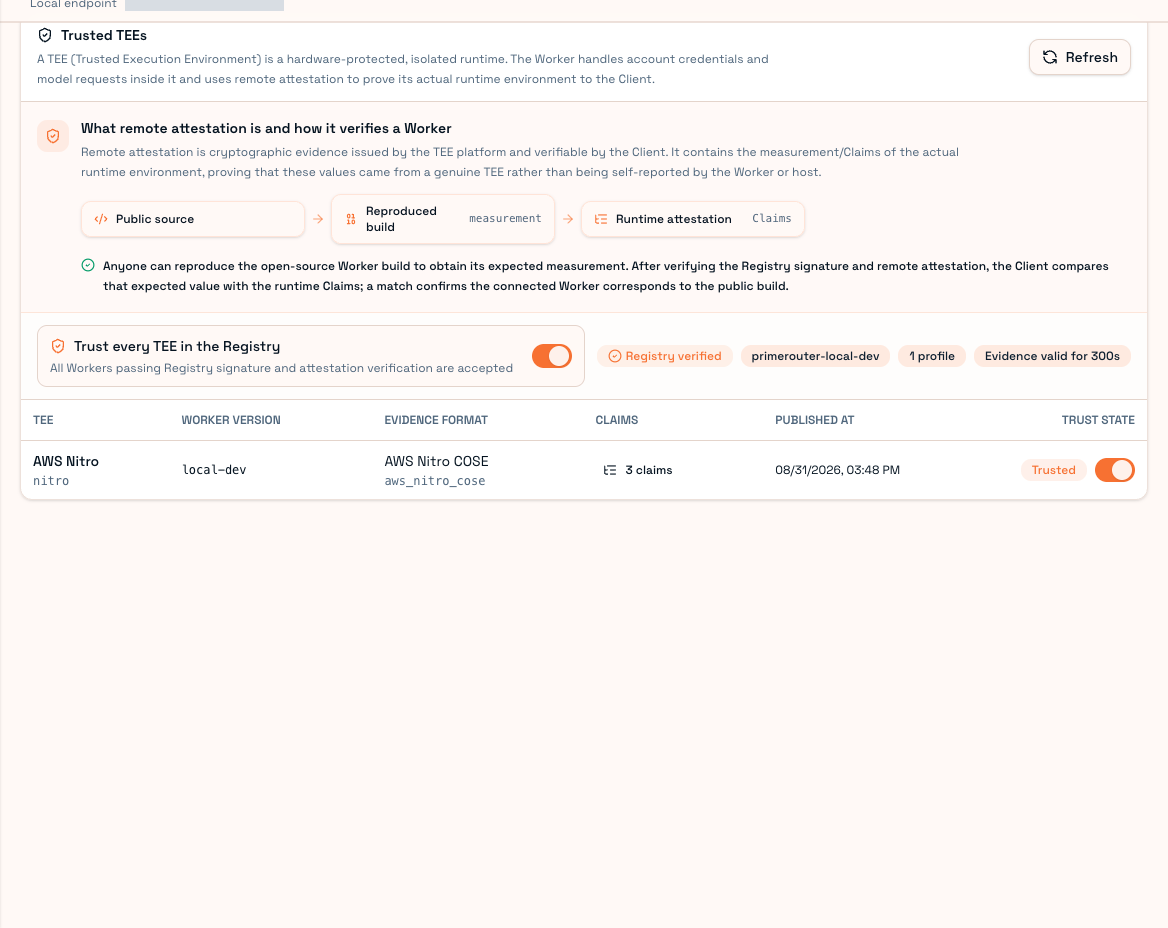
This is a local interface example. Judge your deployment by actual evidence and accepted releases. Development substitutes are not production hardware attestation.
First-use checks
Use an official Client, confirm registry verification, choose a trust scope you understand, and inspect Claims when needed. For failure, review version, registry and network instead of allowing unknown identity merely to connect. Check actual execution identity after a minimal request.
Limits
Client–Worker content is encrypted; Relay handles routing/billing metadata and ciphertext without the body-session decryption key.
The final model provider still receives inference input. This does not hide prompts from OpenAI/Anthropic or turn your computer into a TEE. Local malware, the tool's other network/telemetry traffic and sensitive content need separate handling. Changing Base URL does not route every network call through PrimeRouter.
Receipts help check execution, usage and business state, but one populated field or green screenshot is not proof of all upstream behavior. See Architecture and boundaries.